 Go back to blog


Amazon Attribution: How to Accurately Track Social Media Traffic
Amazon sellers are increasingly driving traffic from social media platforms like TikTok, Instagram, YouTube, Facebook, and more to their Amazon product listings. But without proper tracking, it’s hard to know which external efforts are truly generating sales on Amazon. This is where Amazon Attribution comes in. Amazon Attribution is a free analytics tool that allows brand-registered sellers and vendors to measure how off-Amazon marketing campaigns (social media posts, influencer links, ads, emails, etc.) lead to shopper actions and sales on Amazon.
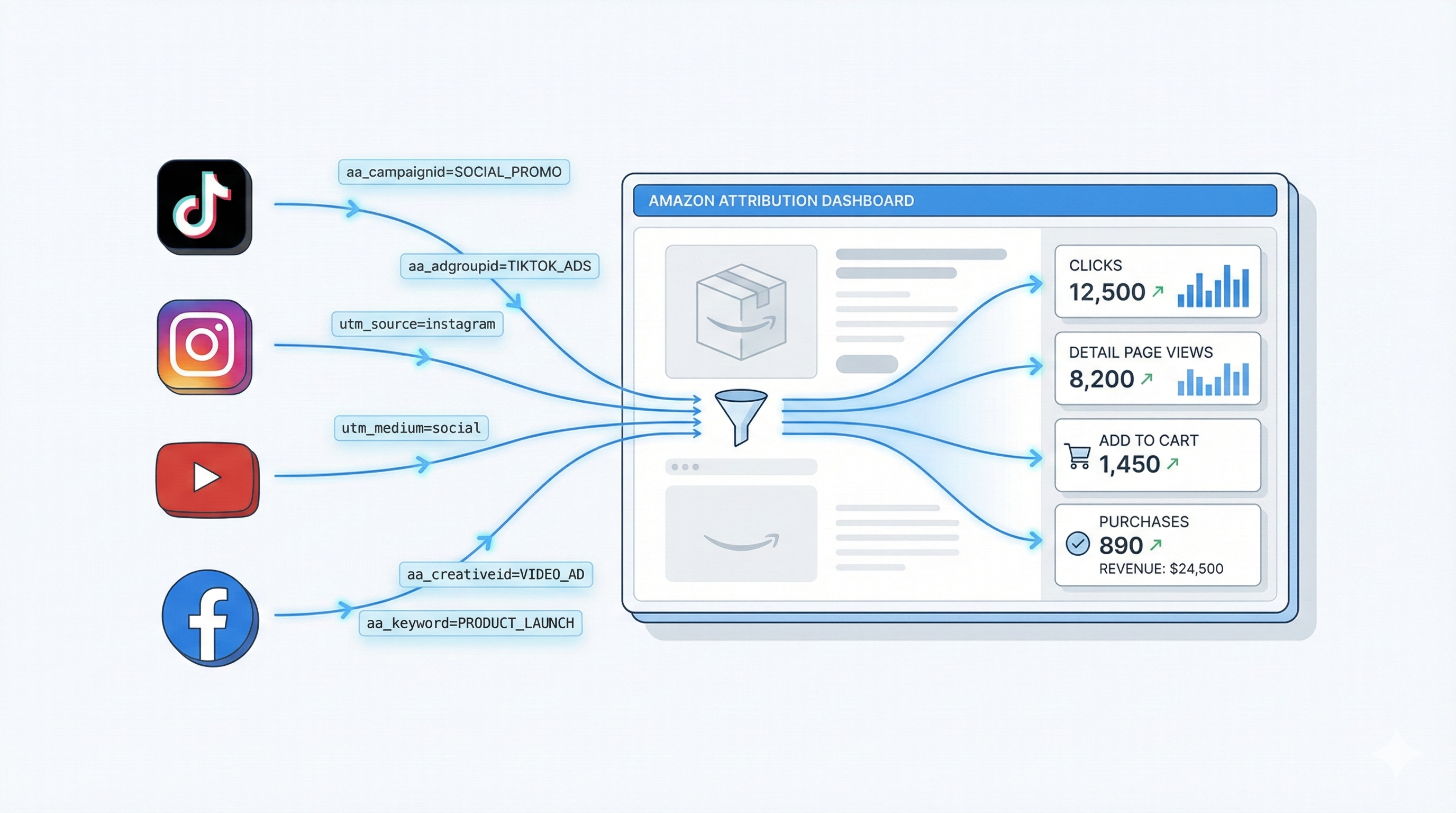

Introduction: Amazon sellers are increasingly driving traffic from social media platforms like TikTok, Instagram, YouTube, Facebook, and more to their Amazon product listings. But without proper tracking, it’s hard to know which external efforts are truly generating sales on Amazon. This is where Amazon Attribution comes in. Amazon Attribution is a free analytics tool that allows brand-registered sellers and vendors to measure how off-Amazon marketing campaigns (social media posts, influencer links, ads, emails, etc.) lead to shopper actions and sales on Amazon. In other words, it connects the dots between your external traffic and your Amazon performance, ending the “black box” of not knowing which Facebook post or TikTok video is driving purchases. This in-depth guide will explain what Amazon Attribution is, how it works, and provide step-by-step instructions to set up attribution links for your social media campaigns. We’ll also cover best practices (like naming conventions and UTM tags), discuss the tool’s limitations and pitfalls, and show how to supplement Amazon’s data with additional analytics. Whether you’re new or experienced, by the end of this guide you’ll know exactly how to track and optimize social media traffic to Amazon.
What is Amazon Attribution and Why Does It Matter?
Amazon Attribution is a measurement solution offered through Amazon’s advertising console that uses special tracking URLs (attribution “tags”) to monitor what happens after a customer clicks an external link to Amazon. When someone clicks your Amazon Attribution link from a social media post or ad, Amazon records their ensuing actions on Amazon – from product detail page views to add-to-cart events and ultimately purchases. These metrics are reported in an Amazon Attribution dashboard, giving you full-funnel visibility into how your external traffic is engaging with your Amazon listings.
For Amazon sellers, this capability is a game-changer. Before Amazon Attribution, all external sales were lumped together and it was nearly impossible to know which channel (TikTok, Instagram, YouTube, etc.) drove a given sale. Now, by generating unique tracking links for each campaign, you can see exactly where your buyers came from and how they interacted on Amazon. This insight is crucial for optimizing your marketing spend – you might discover, for example, that a TikTok video with few likes actually led to dozens of Amazon sales, while a popular Instagram post drove lots of traffic but no conversions. With Amazon Attribution, sellers can identify their most valuable traffic sources, calculate ROI for external campaigns, and double down on what works.
Why it matters: Driving high-quality outside traffic can boost your Amazon business in multiple ways. External visitors represent new potential customers who might not find you via Amazon search. Moreover, Amazon’s algorithm rewards external sales – consistent off-Amazon traffic that converts can improve your keyword rankings and organic visibility on Amazon. Amazon Attribution not only measures these sales, but also unlocks Amazon’s Brand Referral Bonus program. The Brand Referral Bonus gives brand-registered sellers up to 10% of the sale price back as a credit for any purchase that came through an Amazon Attribution link. This effectively rewards you for bringing in outside shoppers, offsetting your ad costs and improving profitability. In short, Amazon Attribution lets you prove and amplify the impact of social media marketing on your Amazon sales, while also potentially earning you bonus credits for those sales.
How Amazon Attribution Works (Overview of Tracking)
When you use Amazon Attribution, you’ll create a special URL (tracking link) for each external campaign or traffic source you want to monitor. These links look like regular Amazon URLs with extra parameters attached. For example, an Amazon Attribution link might look like:
https://www.amazon.com/dp/YourProductASIN?aa_adgroupid=xyz&aa_campaignid=abc...&ref_=aa_maas
Each parameter in the URL corresponds to the campaign and ad details you set up. When a user clicks this link to visit your Amazon product page, those parameters tell Amazon which campaign delivered the traffic. Amazon then tracks everything that user does on Amazon within a 14-day window after the click (for the products you’re tracking). This 14-day attribution window means if the shopper purchases within 2 weeks of clicking, it will count as a conversion for that tracking tag. Amazon Attributionuses last-touch attribution, so the sale is credited to the last Amazon Attribution link the customer clicked before buying.
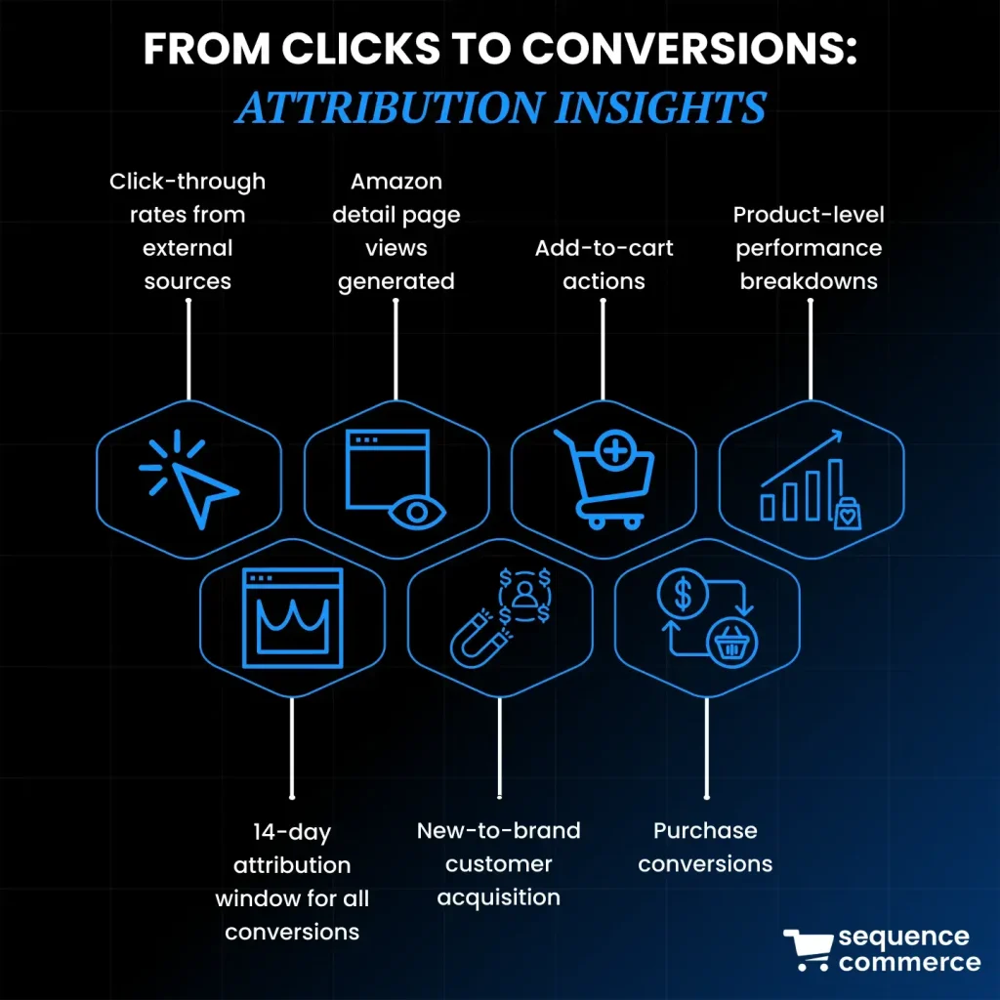
Example: An Amazon Attribution dashboard can show the full funnel from clicks to conversions. In this illustration, you can see how external clicks lead to detail page views, add-to-carts, and purchases on Amazon (with metrics like DPV = Detail Page Views, ATC = Add to Cart). Amazon Attribution provides these insights for each source, helping you visualize the customer journey from social media click to Amazon sale.
Metrics Tracked: Amazon Attribution captures a range of metrics once the customer lands on Amazon. Key metrics include click-throughs (visits), product detail page views, Add-to-Cart actions, and purchases (with sales revenue). It even reports on new-to-brand customers (if a purchaser hasn’t bought from your brand before) and the total sales value generated. These metrics are available in near real-time via the Attribution dashboard and in downloadable reports. Essentially, Amazon Attribution serves as your on-Amazon analytics for external traffic, similar to how Google Analytics tracks what users do on your own website. The big difference is that Amazon keeps this data within its platform – you can see it in the Amazon Ads console, or via the Amazon Attribution API, but you cannot directly feed it back into Google/Facebook for automated optimization due to Amazon’s closed ecosystem. (Amazon values customer privacy and doesn’t allow retargeting using Attribution data, unlike Facebook Pixel or Google Analytics data.)
In summary, Amazon Attribution works by generating unique tagged links for your external campaigns. When those links are clicked, Amazon records all downstream activity tied to that tag and aggregates it for you. It’s the bridge between, say, your TikTok ad and the Amazon purchase – finally giving credit to the right external campaign.
Step-by-Step: Setting Up Amazon Attribution for Social Media Campaigns
Ready to start tracking? Follow these steps to create Amazon Attribution links for your social media traffic. (Note: Amazon Attribution is available to brand-registered sellers and vendors in supported countries, including the U.S.. Ensure you have Brand Registry and Amazon Ads console access before you begin.)
Step 1 – Access Amazon Attribution: Log in to your Amazon Advertising console (Seller Central’s Campaign Manager). In the top navigation menu, find “Measurement & Reporting” and click “Amazon Attribution”. This will take you to the Amazon Attribution campaign manager. If it’s your first time, you may see an introduction or need to select your advertiser profile. Once there, click the “Create campaign” button to start a new attribution campaign.

Step 2 – Choose Campaign Settings: On the “New Campaign” page, you’ll first enter some basic settings. Give your campaign a Name that makes sense for what you’re tracking. This name is internal (visible to you) and should help you identify the campaign later. For example, if you plan to track TikTok influencer posts in March, you might name it “TikTok_Influencer_Mar2026”. Some sellers include the product or goal in the name as well (e.g. “Instagram_SpringSale2026_BrandStore”). Choose names that clearly distinguish the campaign’s focus – whether it’s by platform, promotion, or product line. Next, select the products you want to track in this campaign. Amazon will show you a list of your brand’s ASINs; you can choose one or multiple. It’s best to include all relevant products that might sell from this campaign (including variations like different colors or sizes). Only the products you add here will have their sales attributed, so don’t leave out items that your social media traffic could buy. If you’re running a broad campaign (e.g., an Instagram ad for your whole brand store), you can add multiple top products or even your whole catalog to capture any sales driven. Ensure each chosen product is in stock and has an active listing (Amazon only lets you track in-stock products).
Step 3 – Create Ad Groups for Each Channel/Ad: Within your campaign, you’ll set up one or more Ad Groups. Think of an ad group as a specific tracking link for a particular source or tactic. It’s a best practice to create one ad group per traffic source or creative that you want to measure separately. For example, under a campaign “Summer 2026 External,” you might have one ad group for a TikTok ad, another for an Instagram post, another for a YouTube video, etc. Each ad group will generate a unique Amazon Attribution tag (URL), so separating them lets you see performance by source. In the Ad Group settings, fill in the following fields:
- Ad Group Name: This is another internal label to identify the specific source or content. Be descriptive – e.g. “TikTok_PaidAd_Video1_Mobile” or “IG_Organic_BioLink”. A suggested naming format is to include the platform, campaign or creative identifier, and even audience or device if relevant. For instance, “YouTube_ReviewInfluencer_Mar2026” or “FBAds_LookalikeAudience_Spring2026”. Consistent naming helps keep your data organized.
- Publisher: Select the traffic source platform from Amazon’s dropdown list. Common options include Facebook, Instagram, Twitter, YouTube, TikTok, Pinterest, etc. (Amazon pre-defines many, under categories like “Social” or “Search”). If your platform isn’t listed (or if it’s a specific influencer or blog site), choose “New” and type in the name. For example, you might enter “TikTok” if not already present, or the name of a specific affiliate site.
- Channel: Choose the category that best fits the traffic source – e.g. “Social”, “Video”, “Display”, “Email”, etc. For TikTok/Instagram/YouTube, you would select “Social” (or “Video” for YouTube if you prefer – Amazon’s interface might classify YouTube as Video). This helps classify the medium in reports.
- Click-Through URL (Destination URL): Paste the Amazon link where you want to send shoppers who click. This can be your product detail page URL (for a specific product listing) or your Amazon Store page if you have a storefront. Use whichever landing page aligns with your campaign goal. For instance, if an Instagram ad is promoting one product, link directly to that product’s page. If a YouTube video covers your brand or multiple products, you might link to your Amazon Store homepage or a sub-page featuring those products. (Tip: Get the clean short URL from Amazon for your product page – the format usually amazon.com/dp/ASIN – and avoid any session or referral parameters in it, since Amazon Attribution will add its own.)
If you want to add more than one ad group (e.g. tracking multiple links or platforms in the same campaign), click “Add new ad group” and repeat the above for each variant. For example, you could create separate ad groups for “TikTok organic post” and “TikTok paid ad” if you plan to use two different links on TikTok. There’s effectively no harm in making many ad groups – Amazon allows hundreds – so it’s often better to be granular and have a distinct tag for each major placement or creative. This granularity will pay off in analysis.
Step 4 – Generate and Copy Your Attribution Links: After setting up the ad group details, click the “Create” or “Save” button. Amazon will now generate the tracking tags for each ad group you created. On the confirmation screen, you’ll see a unique URL (attribution link) for each ad group. You can copy each link individually, or use a “Download CSV” option to export all your new tags at once. Save these links in a secure place – this is the only time they’re shown immediately, though you can always find them again in the Attribution dashboard. It’s a good practice to maintain a master spreadsheet of your Amazon Attribution links, noting which campaign/ad each one corresponds to. For example, have columns for the ad group name, platform, and the full URL. This helps avoid confusion later, especially if you end up making many links. (Pro tip: The attribution link URLs can be long and unwieldy. Consider using a URL shortener (like bit.ly or rebrand.ly) to create a cleaner link for use on social media, particularly for platforms like Instagram or TikTok where you might paste the link in a bio or description. If you do shorten a link, test it to ensure it correctly redirects to Amazon.)
What does an Amazon Attribution link look like? It’s essentially your normal Amazon URL with tracking parameters attached. For example, a link might be:
https://www.amazon.com/dp/B0833P83NP?aa_adgroupid=landingcube_group_36576&aa_campaignid=landingcube_campaign_36576&aa_creativeid=landingcube_creative_36576&...&ref_=aa_maas
In this sample (for a product ASIN B0833P83NP), the aa_campaignid, aa_adgroupid, etc., are unique identifiers that tie the click to the specific campaign and ad group we set up. You don’t actually need to interpret these parameters – Amazon handles that – but it’s good to know how the link is structured. The ref_=aa_maas portion at the end is an indicator that it’s an Amazon Attribution link (MAAS stands for “Amazon Ads” integration).
Step 5 – Implement the Links in Your Social Media Campaigns: Now comes the crucial part – actually using these attribution links in your social media traffic. For each ad group you created, take the corresponding Amazon Attribution URL and plug it into the appropriate place on the social platform. Here’s how this typically works for common scenarios:
- TikTok Ads: In TikTok Ads Manager, when creating your ad, you’ll have a field for the Destination URL. Paste the Amazon Attribution link there. Ensure your call-to-action on the ad (e.g. a “Shop Now” button) uses this URL. TikTok users clicking the ad will be taken to Amazon via that tracking link.
- Instagram or Facebook Ads: In Meta Ads Manager, when you set up an ad that drives off-site, you’ll input the URL for the ad’s target. Use the Amazon Attribution link as the target URL for your Instagram or Facebook ad. (On Facebook, you might paste it into the “Website URL” field of the ad, and for Instagram Story ads ensure the swipe-up/link sticker points to it.) If you’re boosting an Instagram post or running a Facebook campaign, the process is similar – always use the Amazon tracking link in place of a normal Amazon link.
- Organic Instagram (Bio or Story): If you’re placing a link in your Instagram bio, you can shorten the Amazon Attribution URL and use that in your profile. Or if using Instagram Stories with a link sticker, you can directly use the attribution link (though it might be long – a short link is visually cleaner). Make sure to update the link for each campaign if you promote different products over time.
- YouTube Videos: For YouTube, you can put Amazon Attribution links in the video description or a pinned comment. For example, if a YouTube influencer reviews your product, give them the Amazon Attribution link to include in their description (“Get the product here: [Amazon link]”). Viewers clicking that will be tracked. As always, consider using a readable short link if the description looks too messy with a long URL.
- Influencer Posts: For any influencers on TikTok, Instagram, Twitter, etc., provide each influencer a unique Amazon Attribution link (perhaps you created an ad group per influencer). They can include it in their bio, post, or story – wherever a link is allowed. If direct linking isn’t feasible (e.g., TikTok video captions can’t have clickable links), influencers can use a bio link or services like Linktree, embedding the attribution URL there, or use a swipe-up in Stories on IG. The key is that the user eventually clicks the Amazon Attribution tag to reach Amazon.
- Email or Others: If you are sending emails or using a newsletter to drive to Amazon, use the Amazon Attribution link in your email’s call-to-action buttons or hyperlinks. This will track those email-sourced clicks as well.
Essentially, any place you would normally share a plain Amazon product URL, replace it with your Amazon Attribution URL so that clicks are tracked. Double-check that the links work by testing them yourself (click and see that it leads to the correct Amazon page). Once implemented, you can proceed to run your social media campaigns as usual.
Step 6 – Monitor Performance and Optimize: After your links are live and people start clicking them, head back to the Amazon Attribution dashboard to watch the data come in. Amazon will report metrics per tag (ad group) so you can see, for example, that your “TikTok Ad Video1” tag got 500 clicks, 300 product detail views, 50 add-to-carts, and 20 purchases in the past week, whereas your “Instagram Bio Link” tag got 100 clicks and 5 purchases. Give it some time to accumulate data (and remember the conversion may happen up to 14 days later). Use these insights to adjust your strategies – if one platform or creative has a much higher conversion rate, consider allocating more budget or effort to it. Likewise, if an external campaign is getting lots of clicks but no sales, you might tweak the targeting or the landing page content (maybe the product page needs better info or the offer needs to be clearer). We’ll discuss more on analysis later, but monitoring your Attribution results at least weekly is a good practice. The interface allows you to filter by date ranges and view metrics at the campaign, publisher, ad group, or product level. You can also download reports for offline analysis or share with your team.
Using Bulk Creation (Optional): The above steps described the manual setup, which is ideal for most social media campaigns and a handful of links. If you are running large-scale campaigns with dozens or hundreds of ads (for example, a Google Ads campaign with thousands of keywords, or a Facebook Ads campaign with many creatives), Amazon Attribution provides a Bulk Upload option. This lets you use a spreadsheet template to create multiple tags at once. The bulk templates are specific to Google or Facebook/Instagram campaigns and allow up to 100,000 Google keywords or 8,500 Facebook ads in one file. You would download the template, fill in columns for campaign name, ad group, channel, etc., and upload it to generate tags in bulk. Bulk setup can save time and reduce manual errors if you have very large campaigns. However, for tracking a few social media posts or influencer links, it’s usually simplest to create tags manually as we did in the steps above.
Best Practices for Naming, Organizing Campaigns, and UTMs
Setting up Amazon Attribution is one thing – setting it up smartly is another. To get the most actionable insights, you should be deliberate in how you name and structure your attribution campaigns. Additionally, you might wonder how Google Analytics UTM parameters fit into this picture. Let’s break down some best practices:
Use Clear Naming Conventions: Establish a standard naming scheme for your campaigns and tags so that anyone on your team can understand them at a glance. For campaigns, consider including elements like the channel, campaign objective or type, and time frame. For example, one recommended convention is [Channel]_[CampaignType]_[Audience]_[Quarter]_[Year]. An example following this format could be TikTok_UGC_ViralChallenge_Q3_2025 or Instagram_Promo_NewLaunch_Q1_2026 – indicating what platform and purpose the campaign has. Ad group names can be even more granular. You might include the platform plus specific creative or targeting info, like [Platform][Targeting]_[Creative]_[Device]. For instance: IGAds_Lookalike30d_VideoAd_mobile or YouTube_InfluencerReview_desktop. The key is consistency – use the same delimiters (underscores or dashes), and a logical order of info. Avoid generic names like “TestCampaign1” or “MyLink” which won’t be informative later. Good naming conventions ensure that when you see a conversion in your reports, you immediately know which campaign and tactic it came from.
Structure Campaigns Logically: How you group your attribution links into campaigns and ad groups will determine the level of insight you get. A common mistake is lumping too many disparate links into one campaign or one ad group, which muddles the data. Instead, structure campaigns in a meaningful way. You might set up separate campaigns for each platform (e.g., one for TikTok, one for Instagram, one for YouTube), each containing ad groups for individual ads or posts. Or you might organize by marketing initiative – e.g., a campaign for “Holiday 2025 Promo” that includes multiple channels’ tags under it. Choose what makes analysis easiest for you. If you want to compare performance across channels, separate campaigns per channel might be best so you can see totals per platform. If you want to measure a multi-channel campaign collectively, grouping them can help. In any case, within a campaign, use one ad group per unique traffic source or creative as mentioned. This yields granular data so you can pinpoint, for example, which specific TikTok video or which influencer drove the most sales. Granularity is your friend – you can always aggregate results later, but you can’t break apart combined data.
Leverage UTM Parameters Wisely: UTMs (Urchin Tracking Module parameters) are those utm_source, utm_campaign tags you often use to track traffic in Google Analytics. When driving traffic directly to Amazon, Google Analytics on your own site isn’t in play (since the user goes to Amazon, where you can’t put your GA tracking code). Therefore, UTMs on an Amazon link won’t be captured by you in GA – Amazon doesn’t pass that data to sellers. Amazon Attribution itself uses its own parameters (aa_campaignid etc.) rather than UTMs to track conversions. This means you usually don’t need to add UTMs to your Amazon Attribution links for Amazon’s sake. Amazon’s system already attributes the sale via the tag, and it will tell you the source through the campaign/ad group names you set. In fact, adding extra query parameters to an Amazon Attribution URL is not recommended unless you have a specific reason, because it could potentially confuse the link or Amazon might ignore them.
So when do UTMs matter? If you use an intermediate landing page or your own website in the funnel, UTMs become useful. For example, some advanced sellers send traffic from a Facebook ad to a custom landing page (to capture email or pixel data) and then have a button “Buy on Amazon” which uses the Amazon Attribution link. In that case, your Facebook ad link could have UTMs to track the click in Google Analytics on your site, and then the final Amazon click is tracked by Amazon Attribution. Another scenario: if you link to an Amazon Store page (instead of a product page), Amazon Stores have a feature where you can add ?channel= or ?tag= parameters to identify traffic sources in the Store analytics. For instance, https://www.amazon.com/yourStore?pageId=xyz&channel=InstagramBio could help you see store visit attribution by channel in the Store Insights. This is separate from Amazon Attribution, but you could use it in tandem – if your attribution link destination is a Store, you might incorporate a channel tag for Store metrics. According to Amazon, you can append a channel parameter to store URLs to track visits by that tag. Just remember that Amazon Attribution requires its own tag regardless – you can’t simply rely on a UTM or channel param to get sales data; you must use the Amazon Attribution-generated link to get conversion tracking.
If you do decide to use UTMs in any part of your external campaign (like on an intermediary page or just for the sake of record-keeping), follow standard UTM best practices: use consistent, lowercase values with no spaces (use - or _ instead). For example, use utm_source=tiktok not utm_source=TikTokApp in one place and Tik_Tok in another – define a standard (tiktok, instagram, youtube, etc. all lowercase). Keep campaign names concise and meaningful (e.g., utm_campaign=summer_sale_2026). Consistency in UTM naming will ensure your Google Analytics or other tracking sees them as one source. But again, UTMs are optional for Amazon-focused campaigns unless you have a website analytics component. The primary tracking for conversions will be done by Amazon Attribution itself.
Tip: Many social ad platforms allow you to input UTMs when building ads (Facebook Ads Manager, TikTok Ads, etc., have fields for URL parameters). You could, for instance, put utm_source=facebook&utm_medium=cpc&utm_campaign=summer2026 in a Facebook ad, even if the URL is Amazon. Those UTMs won’t show up in Amazon data, but if you are also monitoring click data via the ad platform or a third-party, it might help categorize. Use them if they serve your analysis outside Amazon, but don’t rely on UTMs to do what Amazon Attribution is doing internally.
Track Your Attribution Links in a Master Sheet: This was hinted earlier, but it’s worth reiterating as a best practice. Maintain a simple spreadsheet or tracking document for all your Amazon Attribution campaigns and tags. Include columns like: Campaign Name, Ad Group Name, Channel/Platform, Target URL (product or store page), Attribution Link URL, and maybe notes on where it’s deployed (e.g., “used in TikTok ad ID 1234” or “given to influencer X on IG”). This serves several purposes:
- It prevents reusing the wrong link in the wrong place.
- It allows quick lookup if you see a weirdly named tag in your Amazon report.
- You can annotate performance or costs alongside each link for deeper analysis (more on that in the next section).
Also, if multiple team members or agencies are involved, a shared document ensures everyone uses the correct tracking link for the correct campaign.
Limitations and Pitfalls of Amazon Attribution
While Amazon Attribution is a powerful tool, it’s not perfect and comes with some limitations you should be aware of. Understanding these will help you interpret the data correctly and avoid common mistakes in implementation.
- 14-Day Last Click Window: Amazon Attribution uses a 14-day last-touch model. This means if a customer clicks your external link and buys within 14 days (and doesn’t click another seller’s ad in between), you get the attribution. However, any purchase after 14 days from the click will not be credited to that campaign. This is generally fine for most short purchase cycles, but be mindful if you have a product that customers research for a long time. It also means multi-touch paths aren’t differentiated – if a customer clicks your Instagram link, then two days later clicks your YouTube link for the same product and then buys, only the last link (YouTube) gets the sale attributed. Amazon Attribution does not currently provide multi-touch attribution or assist metrics; it’s essentially last-click per conversion. The takeaway: always consider the full 2-week period when evaluating a campaign’s performance (don’t declare a campaign a failure if day-1 sales are low; many conversions might roll in days later), and know that the data attributes 100% of a sale to one source.
- No Off-Amazon Retargeting Data: As mentioned, Amazon keeps the attribution data within its ecosystem. You cannot export individual user-level data or feed it to Facebook/Google for retargeting or lookalike modeling. Amazon Attribution won’t give you things like customer emails or allow you to create audiences. It’s purely for measurement. So while you learn which campaigns drive sales, you can’t directly use that info to re-engage those specific customers off Amazon. This is a strategic limitation – Amazon won’t let sellers drop retargeting pixels on Amazon’s site. To build your own customer lists or do retargeting, you’d need that intermediate landing page to capture users before they hit Amazon.
- Brand Registry Requirement: Only sellers enrolled in Brand Registry (or vendors, or agencies managing a brand) can use Amazon Attribution. If you are not brand-registered, you won’t have access to this tool. This is a limitation for smaller or newer sellers who haven’t trademarked their brand yet. The advice here is to get Brand Registered as soon as possible – not just for Attribution, but for many other benefits on Amazon.
- Campaign Eligibility and Product Mapping: You might encounter a situation where some of your products don’t show up to be added in an Attribution campaign, or products that aren’t yours appear. This has to do with Amazon’s “brand-to-product mapping.” If the console shows a limited set of products, you may need to adjust your brand’s catalog mapping under Amazon Attribution settings. Ensure all your relevant ASINs are correctly associated with your brand in Amazon’s system, so that their sales can be tracked. Missing products in a campaign is a common pitfall – if not included, any sales of that product won’t be counted, even if the link led the customer there. Always double-check you included all variations or related ASINs in the campaign if you want their sales tracked.
- Potential Data Gaps on Mobile vs Desktop: Amazon Attribution links generally work across devices (they are essentially just URLs). But one nuance – if you are running device-specific campaigns (e.g., a mobile-only Facebook campaign vs a desktop placement), you might consider splitting into separate ad groups/links for mobile and desktop. The reason is to see if, say, mobile visitors behave differently. One noted best practice is to differentiate by device in your tags if you can. Not doing so isn’t exactly a “gap” in tracking, but you may miss insight. Also, ensure the link is mobile-friendly: A user on mobile who clicks it will likely be taken to the Amazon app if installed or mobile web. Amazon Attribution should still track that, but if a link isn’t opening correctly on mobile (some older affiliate links had issues; Attribution links are usually fine), that could be a problem. Test on both mobile and desktop.
- Attribution Only for Amazon Conversions: Remember that Amazon Attribution will only report what happens on Amazon. If a customer clicks your link but doesn’t purchase on Amazon (maybe they decided to purchase on your own website instead, or just didn’t purchase at all), that data is effectively lost from Amazon’s perspective. You’ll see a click but no sale, and you won’t know why. This is why combining Amazon data with external analytics can be useful – e.g., your Facebook Ads might show that 100 people clicked, Amazon Attribution shows 80 clicks (some drop-off), and 5 sales. The missing 20 might have bounced before reaching Amazon or the tracking didn’t fire for them. Some discrepancy is normal between ad platforms and Amazon Attribution click counts. Link blockers, users who double-click, or mismatched time zones can cause minor differences. Don’t panic if Amazon shows slightly fewer clicks than the social platform – focus on the conversion metrics primarily.
- No Granular Attribution for Multiple Products: If your attribution tag links to a Store or includes multiple products, Amazon will tell you total sales and which products sold, but it might not tie each sale to the exact creative that drove it if multiple ad groups contain the same products. A best practice is to have one tag per creative anyway. But be aware: if one link leads to a Store where a customer could buy any of 10 products, the attribution report will show which of those 10 sold. It’s quite useful in that sense (you can see product-level breakdowns), but if you had multiple different ads pointing to the same Store page with the same tag, you wouldn’t know which ad was more effective. Avoid sharing one tag across different postings – it might be tempting to reuse a link for convenience, but then you lose clarity. Rather, generate separate tags even if they point to the same page, if they correspond to different traffic sources.
- Data Delays and Reporting Quirks: Amazon Attribution data is not instantaneously updated for conversions. Clicks and page views often show up quickly, but sales and revenue might only populate after the order is shipped or at least confirmed. There can be a delay of a few hours to a day for sales data to fully appear, so don’t expect real-time sales numbers (despite Amazon advertising calling it “on-demand” metrics – it’s faster than Seller Central orders report, but not instant). Additionally, if a customer places an order and later returns the item, the attribution sale might still be counted in the dashboard (depending on timing), or it might be negated later. So use the data primarily for optimization trends, not as official accounting – your actual Amazon payout will consider returns, etc., separately.
- International Traffic Considerations: If your social media campaign reaches international audiences, be aware that Amazon Attribution tags are marketplace-specific. A tracking link for Amazon.com (USA) will not attribute sales on Amazon.co.uk or other domains. If you have significant traffic from abroad, ideally direct them to the appropriate Amazon site. This could mean creating separate attribution links for each country’s Amazon (Amazon has Attribution in the UK, CA, DE, etc., for brand-registered sellers there). Tools like Geniuslink or Pixelfy can route users to their local Amazon store. But a U.S.-based seller focused on Amazon.com may not need this. Just keep in mind, a UK customer who somehow uses your US attribution link but then buys on Amazon UK won’t count – because the link didn’t direct to Amazon UK in the first place. This is a limitation of cross-market tracking.
- Human Error in Implementation: Many pitfalls come from simple mistakes – copying the wrong link, pasting it incorrectly, or forgetting to use the attribution link at all. Always double-check that the exact Amazon Attribution URL is used in the live ad or post. If an influencer accidentally removes a character or adds extra text, the tracking might break (Amazon Attribution links need to be used exactly as given). If you copy and paste into a social platform, ensure no extra spaces or characters got added, which could result in an invalid URL. Amazon does validate URLs when you create tags and will warn you if something is formatted wrong at that time, but once you have the link, its proper use is up to you. A common error is to launch a campaign and later realize the link used was just a plain Amazon link (no attribution parameters) – in which case you’d get zero tracking data for that effort. Discipline and careful link management are key.
In summary, Amazon Attribution is extremely useful but not all-powerful. It provides last-click sales tracking for Amazon – it doesn’t do multi-touch or off-Amazon tracking, and it requires correct setup. By understanding the constraints (time window, data silo, need for brand registry, etc.), you can better interpret the results and avoid overestimating or underestimating a campaign’s impact. Use Amazon Attribution data as a guide alongside other analytics, and you’ll get the clearest picture of your social media ROI.
Using Amazon Attribution Data Alongside Other Analytics
Now that you’re tracking social media traffic with Amazon Attribution, how do you make the most of the data? In this section, we’ll discuss how to analyze and act on the results, and how to supplement Amazon’s data with external analytics (like Google Analytics or spreadsheets) for a more complete view of your marketing funnel.
Monitor the Amazon Attribution Dashboard: The Attribution dashboard in Amazon Ads is your primary window into performance. Here you can see each tracking tag (ad group) and metrics like impressions, clicks, detail page views, add-to-carts, purchase rate, and total sales. It’s useful to check this regularly (e.g. weekly) and compare tags. For instance, you might observe that your “TikTok Ad #1” got 1,000 clicks and $500 in sales, while “Instagram Story Link” got 500 clicks and $300 in sales. From this you could calculate conversion rates and ROAS (Return on Ad Spend, if you know how much you spent on each platform’s ads). Amazon’s dashboard allows basic sorting and filtering, but for deeper analysis you might export the data.
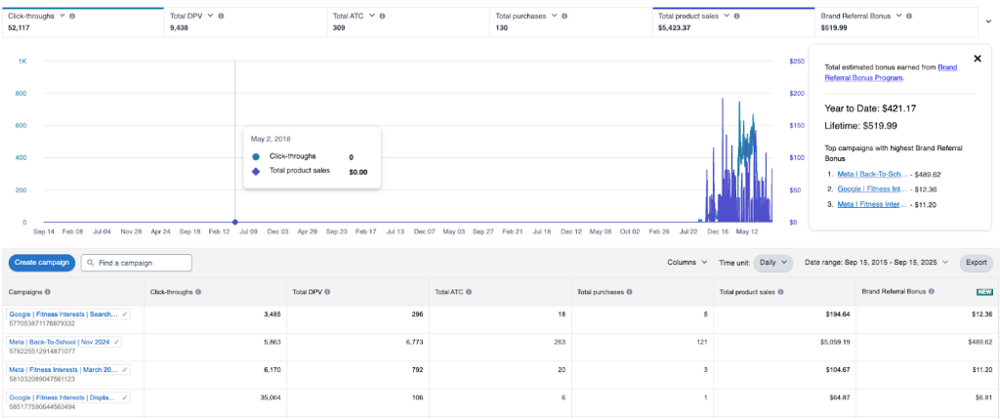
One metric to pay attention to is the detail page view to purchase rate. If one source has a lot of clicks but relatively few detail page views, it might mean many people bounced quickly (the traffic might not be well-targeted or the product page load speed could be an issue). If you have many detail views but low add-to-carts, perhaps the product detail page content isn’t convincing or the offer isn’t compelling to those visitors. A high add-to-cart but lower purchase could indicate people hesitated at checkout (price, shipping, etc.). By comparing these funnel metrics across channels, you can diagnose where a particular traffic source might be weaker and address it. For example, maybe TikTok drives tons of traffic (high clicks) but the audience skews younger and doesn’t purchase a pricey item – you might then tweak the content or target a different demo on TikTok.
Calculate ROI and Efficiency: Amazon Attribution will tell you how many sales (and dollar value of sales) each campaign produced. To know if that’s “good,” you should compare it to what you invested in that campaign. This is where you combine Amazon data with your social platform ad spend or costs. For a paid ad campaign, note the ad spend (from TikTok Ads, Facebook Ads, etc.) for the timeframe. Then using the Amazon sales data, calculate ROAS (Return On Ad Spend) = Revenue / Ad Cost. For example, $500 in Amazon sales from a $100 TikTok ad spend is a 5.0 ROAS (or 500%). Whether that’s good depends on your profit margins, but generally above 1.0 (100%) means you made more than you spent in revenue, though you might aim for higher to cover Amazon fees and cost of goods. Amazon Attribution can’t calculate ROAS for you since it doesn’t know your ad costs, so doing this in a spreadsheet is helpful. If a campaign isn’t profitable (ROAS < 1 or ACOS (ad cost as % of sales) too high), you might reduce spend or refine targeting. If it’s very profitable, consider scaling it up.
For organic efforts (like an influencer post or a YouTube video you didn’t pay for, aside from perhaps a free product sample), the “spend” might be $0 or a one-time fee you paid the influencer. You can still compute ROI qualitatively – e.g., an influencer post cost you $200 worth of free product and resulted in $1,000 in sales, a nice return. Or if it cost $1,000 and got $200 in sales, that was not effective. Having these numbers helps you decide future collaborations. You might also track CPC (Cost per Click) by taking ad spend divided by number of Amazon click-throughs, to see which platform gives cheaper traffic, and CPA (Cost per Acquisition) by dividing spend by number of purchases attributed (this tells you how much it cost in advertising to get one sale via that channel).
All these calculations require pulling data from different sources: Amazon gives the conversions, social platforms give the spend and clicks. This is where a unified tracking sheet or dashboard is invaluable. You can make a table where each row is a campaign/tag, and columns for Amazon clicks, Amazon sales, etc., alongside columns where you input ad spend and platform-reported clicks. Then compute metrics like conversion rate (purchases/clicks), cost per click, cost per sale, ROAS, etc. Doing this routinely (say monthly) will highlight trends, like perhaps TikTok started strong but then fatigued, or Instagram gets fewer clicks but higher conversion rate than Facebook, etc.
Using Google Analytics or Third-Party Analytics: If you incorporate any intermediate landing pages or if you simply want to verify traffic, Google Analytics can be useful. For example, if you send traffic to a landing page that then redirects to Amazon, GA can measure how many people clicked through to Amazon (maybe via a button click event). You might see drop-off (e.g., 1,000 clicked your ad, 800 landed on your page, 600 clicked through to Amazon – so 200 never made it to Amazon). This could inform you about landing page effectiveness. However, if you directly link to Amazon from the social platform, GA isn’t involved. In that case, you rely on the ad platform’s click count (e.g., TikTok reports 1000 clicks) vs Amazon’s report of clicks. If there’s a major discrepancy, investigate if the link might be broken or if perhaps many users backed out before Amazon fully loaded. Typically, they should be in the same ballpark.
If you have your own website where some users go before Amazon, using UTM parameters (as discussed) will allow GA to attribute which source they came from. You could then even track that user’s behavior on your site (maybe they watched a demo video on your landing page) before they hit Amazon. Though once they jump to Amazon, GA loses them. Some advanced sellers use Amazon Attribution’s API to export data and mix it with GA or other analytics tools to get a more seamless view. If you’re analytically inclined, you could integrate Amazon Attribution data into Google Data Studio (Looker Studio) or a BI tool like Tableau or Power BI. Amazon provides APIs where you can programmatically pull attribution metrics. There are also third-party tools (referring to the Amazon Attribution API integration) that can aggregate this for you. But for most, a manual export or CSV download from Amazon and a manual entry of ad spend into Excel is sufficient to glean insights.
Attribution Dashboards and Templates: You may consider building a simple dashboard or template to regularly report on your external campaigns. For example:
- A Google Sheets template where you paste in Amazon Attribution data (or at least key numbers) and your spend, which then auto-calculates the KPIs mentioned above.
- A visual dashboard (maybe in Data Studio) with charts showing which channel has the highest sales, or trends over time of external traffic conversions.
- A template for UTM tracking if you use it: e.g., a tab listing all your UTM parameters and their definitions, to keep consistency (since internal marketing teams often document naming conventions for UTMs).
For those who love automation, tools like PixelMe, Amazon Attribution via Helium 10, or Amazon’s own AMC (Amazon Marketing Cloud) can enrich your attribution. PixelMe, for instance, can create short links with your Amazon Attribution built-in and give some extra analytics (like retargeting pixels on the shortlink). Amazon Marketing Cloud is an advanced analytics environment where you can query more detailed journey data, but that’s beyond the scope for most sellers.
One practical template many find useful is a Brand Referral Bonus tracker. Since Amazon gives up to 10% back on attributed sales, you could keep a sheet of how much bonus you’ve earned each month per campaign. Amazon will credit this bonus to your seller account (usually you see it in your payment reports). Tracking it can highlight the effective “discount” you got on your ad spend. For example, if you spent $500 on an Instagram campaign and it drove $1000 in sales, you might receive ~$100 back as a bonus (assuming ~10%). That effectively makes your net ad spend $400, improving your ROAS. So, including the bonus in your ROI calculations is worthwhile. The Amazon Attribution dashboard does not explicitly show the dollar bonus, but it shows the sales amount; you then apply the percentage. (Some sellers include a column “Est. Bonus” = 10% of Amazon sales in their reports.)
Finally, ensure you learn and adjust. The goal of all this tracking is to improve your marketing outcomes. Use the data to answer questions like: Which social media platform should I invest more in? What type of content converts best for my Amazon products? Do I get better new-to-brand customers from YouTube or from Instagram? Perhaps you’ll find that TikTok drives lots of new customers but maybe smaller orders, whereas YouTube drives fewer but higher-value sales. These insights can shape your future strategy – maybe you’ll engage more YouTube influencers for high-ROI traffic and use TikTok for awareness and volume. With proper tracking and analysis, you move from guesswork to data-driven decisions, which is the real power of Amazon Attribution.
Examples of Link Structures, Tracking Sheets, and Attribution Dashboards
To make the abstract advice above more concrete, let’s walk through a few examples and templates that illustrate how to structure your tracking links and data:
- Attribution Link Structure Example: Suppose you are creating an Amazon Attribution tag for a YouTube review video of your product. You go through the Amazon Attribution setup and name the campaign “YouTube_Reviews_Q1_2026” and the ad group “YouTube_TechGuruReview_Jan2026”. You select your product ASIN (let’s say B012345XYZ) and generate the tag. Amazon gives you a URL like:
https://www.amazon.com/dp/B012345XYZ?aa_campaignid=YT_campaign_Q126&aa_adgroupid=YT_TechGuru_Jan&aa_creativeid=video_review&...
- (It will have additional parameters and a ref code.) You can see parts of the tag correspond to what you entered (campaignid and adgroupid often include your names). This link is what you’d give to the YouTuber to put in the video description. If 500 people click that link and 50 buy the product on Amazon, those 50 sales (and any add-to-carts, etc.) will show up under that specific tag in your dashboard.
- Naming Template Example: As a template for naming, imagine you have these campaigns: one for general Instagram ads and one for a seasonal TikTok push. You might use:
- Campaign names: InstagramAds_BrandAwareness_Q2_2026, TikTok_Organic_SummerLaunch_2026.
- Ad group names under the first might be IGAds_Carousel_April2026 and IGAds_Story_May2026 for two different ad formats. Under the TikTok campaign, maybe TikTok_Post_June2026 and TikTok_Influencer_X_June2026.
This consistent labeling (Platform_Type_Timeframe) makes it easy later to filter or search in your reports (e.g., filter “TikTok” to see all TikTok-related tags).
- Tracking Spreadsheet Example: In a Google Sheet, you set up columns like: Campaign, Ad Group (Tag) Name, Platform, Link URL, Ad Spend, Clicks (from platform), Clicks (Amazon reported), Detail Page Views, Adds to Cart, Purchases, Sales $, Conversion Rate (Purchases/Clicks), ROAS (Sales/Spend). Each row is one ad group (tag). You fill in the spend and platform clicks from your ads manager, and you fill the Amazon metrics from the Attribution report. Then formulas calculate conversion and ROAS. Such a sheet might look like:
- CampaignAd Group (Tag)PlatformSpendPlatform ClicksAmazon ClicksDPVATCPurchasesSalesConv. RateROASInstagramAds_BrandAwareness_Q2_2026 | IGAds_Carousel_April2026 | Instagram (paid ad) | $300 | 1,000 | 950 | 800 | 200 | 50 | $1,250 | 5.0% | 4.17x
InstagramAds_BrandAwareness_Q2_2026 | IGAds_Story_May2026 | Instagram (paid ad) | $200 | 800 | 790 | 600 | 150 | 30 | $600 | 3.8% | 3.00x
TikTok_Organic_SummerLaunch_2026 | TikTok_Post_June2026 | TikTok (organic) | $0 | N/A | 500 | 400 | 100 | 20 | $400 | 4.0% | N/A
TikTok_Organic_SummerLaunch_2026 | TikTok_Influencer_X_June2026 | TikTok (influencer) | $500 fee | N/A | 300 | 250 | 80 | 25 | $1000 | 8.3% | 2.00x - (The above numbers are hypothetical. “Conv. Rate” is Purchases divided by Amazon Clicks; ROAS is Sales divided by Spend. For organic/influencer where spend isn’t through an ad platform, you can input whatever cost you associate – here we put a $500 fee for the influencer and then see we got $1000 sales, ROAS 2.0x.) This kind of table makes it clear which efforts are paying off. For example, influencer X in June got a higher conversion rate (8.3%) than our ad campaigns (~4-5%), but we did pay them $500, yielding ROAS 2.0 which is okay but not as high as the Instagram Carousel ad’s 4.17. This insight might lead us to renegotiate influencer fees or optimize their content, or it might show that Instagram Story ads underperformed relative to Carousel ads (maybe we’ll invest more in Carousel format).
- Attribution Dashboard Example: In Amazon’s own interface, you might have a view where you see total metrics by channel. For instance, a pie chart or bar chart that shows “Facebook = $5,000 sales, Instagram = $3,000, TikTok = $2,000, YouTube = $1,000” in a given period, if you aggregate by publisher. Amazon’s dashboard has a visualization section with multi-dimensional reports. You can group data by channel or by campaign. If you prefer visuals, export the data and create charts. An example chart could be a timeline of daily clicks vs daily purchases for each tag – to see if sales track with traffic spikes or if there’s a lag.
- Templates for Link Structure: If using Amazon Store with channel tags, a template might be: https://www.amazon.com/BRANDNAME?channel=Source_Campaign. E.g., .../MyBrandStore?channel=TikTok_July4Promo. You’d then use that as the Click-Through URL when creating an attribution tag (so the final link gets both the Attribution params and your channel tag appended). Just ensure any custom parameters don’t interfere – Amazon Attribution typically appends its query parameters after yours, separated by &.
By using such examples and templates, you create a repeatable process. The first time setting up Amazon Attribution may take a bit of effort, but once you’ve done it, you can templatize the workflow for every new campaign. Have a checklist: Create campaign in Amazon Ads -> Generate tags -> Add to spreadsheet -> Implement in ads -> Monitor and record results -> Optimize. This disciplined approach will make tracking social media traffic second nature, and your data will get richer over time.
Conclusion
In today’s competitive marketplace, Amazon sellers can’t afford to fly blind when driving external traffic. Amazon Attribution provides the missing piece of the puzzle, allowing you to accurately track and measure the impact of social media and other off-Amazon marketing on your Amazon sales. By implementing the steps outlined in this guide, you can create unique attribution links for each of your campaigns on TikTok, Instagram, YouTube, Facebook, and beyond – and finally see which efforts are yielding real ROI on Amazon.
Remember to follow best practices: keep your naming conventions clear, structure your campaigns and ad groups for insightful data, and maintain consistency with any UTMs or external tracking. Be mindful of the tool’s limitations, like the 14-day window and the need for brand registry, and use additional analytics or spreadsheets to complement Amazon’s data for a fuller picture. Tracking isn’t just about collecting data; it’s about applying those insights. Whether it’s reallocating budget to a higher-converting channel, tweaking your social content to improve engagement, or doubling down on an influencer who drives profitable sales – the knowledge you gain from Amazon Attribution can directly inform your strategy.
By accurately tracking social media traffic and iterating based on real performance, you can significantly improve your marketing efficiency. Instead of guessing which TikTok trend or Instagram ad is worth the money, you’ll have the evidence to back your decisions. Over time, this means better conversion rates, higher sales, and a greater return on every marketing dollar. Plus, with the Brand Referral Bonus kicking back a percentage of attributed sales, you’re essentially rewarded twice for mastering external traffic – once in revenue and again in bonus credits.
In short, Amazon Attribution empowers you to turn external traffic into a scalable, optimizable engine for Amazon growth. So take advantage of this free tool and the strategies discussed above. Set up your attribution links, track those clicks to conversions, and use that data to refine your approach. Amazon shoppers may complete the purchase, but it’s your savvy marketing that will have guided them there. With accurate tracking in place, you can keep that pipeline of social media traffic flowing profitably into your Amazon business, boosting your rankings, sales, and overall brand success wherever your customers spend time. Happy tracking and selling!
Go back to blog